
在Sphinx中描述代码
在教程的 前几节 中,您可以阅读如何在Sphinx中编写叙述性或散文式文档。在本节中,您将改为描述代码对象。
Sphinx支持用多种语言描述代码对象,分别是Python、C、C++、JavaScript和reStructuredText。每种语言都可以使用一系列由 域 组织的指令和角色来进行描述。在本教程的其余部分,您将使用Python域,但本节中看到的所有概念也适用于其他域。
Python
描述Python对象
Sphinx提供了多种角色和指令来描述Python对象,所有这些都集中在 Python域 中。例如,您可以使用 py:function 指令来描述Python函数,如下所示:
Creating recipes
----------------

To retrieve a list of random ingredients,
you can use the ``lumache.get_random_ingredients()`` function:

.. py:function:: lumache.get_random_ingredients(kind=None)

   Return a list of random ingredients as strings.

   :param kind: Optional "kind" of ingredients.
   :type kind: list[str] or None
   :return: The ingredients list.
   :rtype: list[str]
将这样呈现:
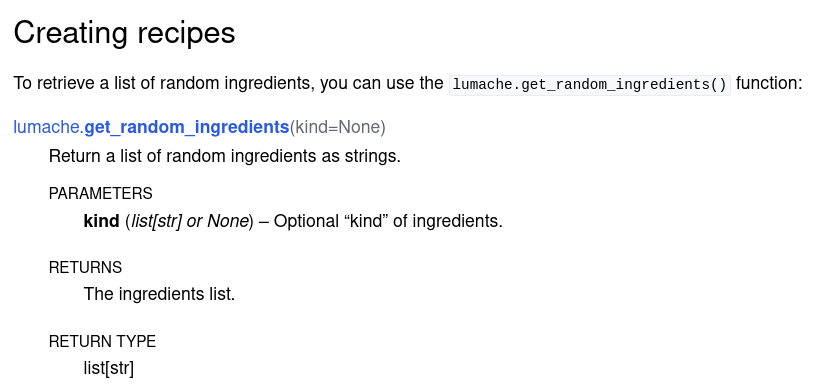
在Sphinx中描述Python函数的渲染结果
请注意以下几点:
Sphinx解析了
.. py:function指令的参数,并适当地突出显示了模块、函数名称和参数。Sphinx指令内容包括函数的一行描述,以及一个 信息字段列表,其中包含函数参数、其预期类型、返回值和返回类型。
备注
py: 前缀指定了 域。您可以配置默认域,以便可以省略前缀,无论是通过 primary_domain 配置全局设置,还是使用 default-domain 指令从调用点更改它直到文件末尾。例如,如果将其设置为 py (默认值),则可以直接编写 .. function::。
交叉引用Python对象
默认情况下,这些指令中的大多数会生成可以通过使用 相应的角色 从文档的任何部分进行交叉引用的实体。对于函数的情况,您可以使用 py:func,如下所示:
The ``kind`` parameter should be either ``"meat"``, ``"fish"``,
or ``"veggies"``. Otherwise, :py:func:`lumache.get_random_ingredients`
will raise an exception.
Sphinx在生成代码文档时,只需使用对象的名称即可自动生成交叉引用,而无需您显式地使用角色。例如,您可以使用 py:exception 指令来描述函数引发的自定义异常:
.. py:exception:: lumache.InvalidKindError

   Raised if the kind is invalid.
然后,将此异常添加到函数的原始描述中:
.. py:function:: lumache.get_random_ingredients(kind=None)

   Return a list of random ingredients as strings.

   :param kind: Optional "kind" of ingredients.
   :type kind: list[str] or None
   :raise lumache.InvalidKindError: If the kind is invalid.
   :return: The ingredients list.
   :rtype: list[str]
最后,结果将如下所示:
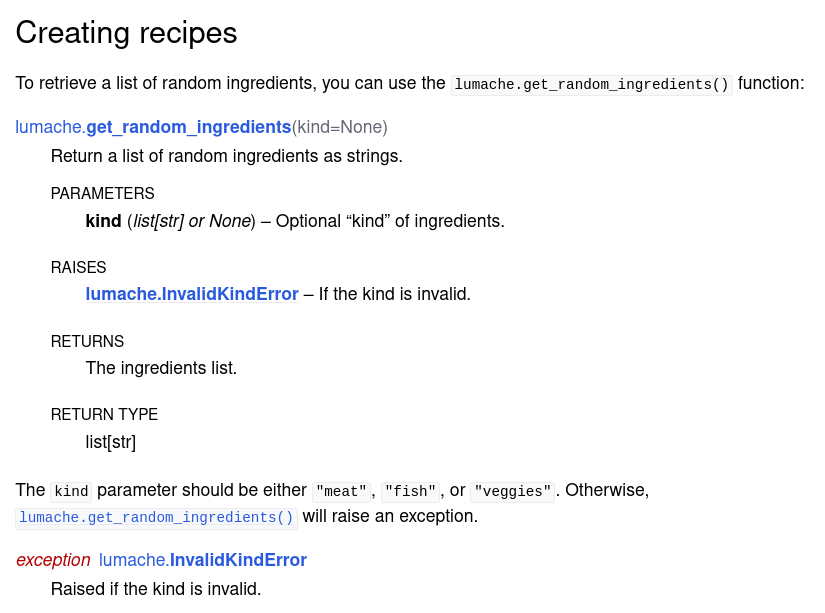
在Sphinx中描述Python函数的HTML结果,带有交叉引用
美观,不是吗?
在文档中包含doctest
既然您现在正在描述Python库中的代码,那么将文档和代码保持尽可能同步将变得非常有用。Sphinx中实现这一点的方法之一是将称为 doctest 的代码片段包含在文档中,这些代码片段在构建文档时会被执行。
为了演示本教程中介绍的doctest和其他Sphinx功能,Sphinx需要能够导入代码。为此,请在 conf.py 的开头编写以下内容:
# If extensions (or modules to document with autodoc) are in another directory,
# add these directories to sys.path here.
import sys
from pathlib import Path
sys.path.insert(0, str(Path(__file__).resolve().parents[2]))
备注
更改 sys.path 变量的另一种方法是创建一个 pyproject.toml 文件并使代码可安装,这样它就像任何其他Python库一样工作。但是,sys.path 方法更简单。
然后,在将doctest添加到文档之前,在 conf.py 中启用 doctest 扩展:
extensions = [
    'sphinx.ext.duration',
    'sphinx.ext.doctest',
]
接下来,编写如下的doctest块:
>>> import lumache
>>> lumache.get_random_ingredients()
['shells', 'gorgonzola', 'parsley']
Doctest包括要运行的Python指令,前面加上 >>>,即标准的Python解释器提示符,以及每条指令的预期输出。这样,Sphinx就可以检查实际输出是否与预期输出匹配。
为了观察doctest失败的样子(而不是像上面那样的代码错误),让我们先错误地编写返回值。因此,添加一个像这样的函数 get_random_ingredients:
def get_random_ingredients(kind=None):
    return ["eggs", "bacon", "spam"]
您现在可以运行 make doctest 来执行文档的doctest。最初这将显示一个错误,因为实际代码的行为与指定的不符:
(.venv) $ make doctest
Running Sphinx v4.2.0
loading pickled environment... done
...
running tests...

Document: usage
---------------
**********************************************************************
File "usage.rst", line 44, in default
Failed example:
    lumache.get_random_ingredients()
Expected:
    ['shells', 'gorgonzola', 'parsley']
Got:
    ['eggs', 'bacon', 'spam']
**********************************************************************
...
make: *** [Makefile:20: doctest] Error 1
正如您所看到的,doctest报告了预期结果和实际结果,便于检查。现在是修复函数的时候了:
def get_random_ingredients(kind=None):
    return ["shells", "gorgonzola", "parsley"]
最后,make doctest 报告成功!
不过,对于大型项目,这种手动方法可能会变得有些乏味。在下一节中,您将看到 如何自动化该过程。
其他语言(C、C++、其他)
描述和交叉引用对象
Sphinx还支持描述和交叉引用用其他编程语言编写的对象。还有四个额外的内置域:C、C++、JavaScript和reStructuredText。第三方扩展可以为更多语言定义域,例如
例如,要描述C++类型定义,您可以使用内置的 cpp:type 指令,如下所示:
.. cpp:type:: std::vector<int> CustomList

   A typedef-like declaration of a type.
将产生以下结果:
-
typedef std::vector<int> CustomList
类型的typedef式声明。
然后,所有这些指令都会生成可以使用相应角色进行交叉引用的引用。例如,要引用前面的类型定义,您可以使用 cpp:type 角色,如下所示:
Cross reference to :cpp:type:`CustomList`.
这将生成一个指向前面定义的超链接: CustomList。